Base44 alternative: how to migrate to livemy.app in 2 minutes
Export your Base44 project, upload it to livemy.app, and get a live URL with your own domain — without losing custom domains, hitting credit limits, or paying for AI generation you’ve already done.
Dmytro Chervonyi
Co-founder & CMO, livemy.app
Last updated
TABLE OF CONTENTS
item
AI Summary
Hit a credit ceiling on Base44? Want your own domain without the platform tax? You can export your project and re-host it on livemy.app — flat $10/month, no credit metering, your own SSL, your own custom domain. The migration runs in about two minutes for a static site. Full-stack apps that rely on Base44’s built-in backend need a second step, because the ZIP export ships your frontend only. Both paths are covered below — exactly what to do, in what order, and where the wall is if you hit one.

Why anyone leaves Base44 in the first place
Base44 is genuinely good at one thing: turning a sentence into a working app. After Wix picked it up, the platform got slicker, the templates multiplied, and the AI got faster. For getting to a v1, few tools beat it.
Three things tend to push people toward an alternative.
Credits don’t stop. Pricing on Base44 starts at $20/month ($16/month with annual billing) after the free tier, and credits get consumed every time the AI builds or refines the app. That’s reasonable when you’re iterating. It becomes annoying when the app is done. You’re paying for AI generation capacity you don’t really need anymore.
The backend lives on Wix. Built-in auth, the database, role permissions — all of it runs on Base44’s infrastructure. Convenient at first. A problem the moment you want a custom integration the platform doesn’t support, or you want to hold your own database, or your CTO friend asks where the data actually sits.
The math gets weird at scale. Base44’s paid plans expand credit allowances, not hosting flexibility. If your goal is “ship the AI builds I’ve already done, cheaply and predictably,” the credit model is the wrong shape.
If any of that sounds familiar, the rest of this article is for you.
The two scenarios that decide your migration path
Whether the migration takes you 2 minutes or 2 hours depends entirely on what kind of app you built on Base44. Worth checking before you start.
Static / frontend-only. Marketing site, landing page, portfolio, brochure site, docs. No login, no database, no Base44 backend services. → Migration: ~2 minutes. Skip to Step 1.
Frontend + external services. App with logins from Auth0/Clerk, data from Supabase or your own API, third-party integrations. → Migration: ~5 minutes. Skip to Step 1.
Full-stack app using Base44’s built-in backend. Logins managed by Base44, data stored in Base44’s database, permissions through Base44 roles. → Frontend migrates fast; backend needs Option A, B, or C (covered in “What if my app uses Base44’s backend” below).

Step 1: Get your project out of Base44
Inside app.base44.com, open the project you want to migrate. Top-right corner — three dots. Open that menu and pick Export project as ZIP.
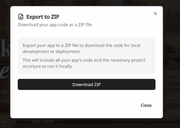
Base44 packages your project’s frontend code, project structure, and assets into a downloadable archive. Save it somewhere you’ll remember in five minutes.
Quick reality check: the ZIP is your frontend only. Any backend functionality that depends on Base44’s built-in services (auth, DB, roles) stays on Base44 and won’t come along automatically. If your app calls external APIs, those calls keep working as long as the APIs are reachable from the new host.
Step 2: Sign up at livemy.app
Head to livemy.app and click Start free. No credit card. You’ll land in my.livemy.app — the dashboard.
For testing the migration end-to-end, the Free plan is enough: 1 project on a livemy.site subdomain, live for 3 days after you create it and then offline, with your code, data and URL kept for 30 days. For production hosting with real visitors, pick Maker ($10/month) before going live — your own custom domain, more projects and deploys, a 99.5% uptime SLA, and the site up around the clock.
Step 3: Upload the ZIP
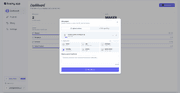
In the dashboard, click New project → Upload archive and select the archive from Step 1. livemy.app auto-detects your stack — React, Vite, Next.js, Vue, plain HTML, whichever framework Base44 generated. No Dockerfile needed.
The upload itself takes a few seconds. Then the deploy starts.
Step 4: Wait two-ish minutes
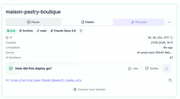
Typical deploy time for a Base44-exported app: 2 to 5 minutes. During this window the platform is doing real work — provisioning a container, installing dependencies, building, configuring HTTPS, routing the traffic. The dashboard shows you a live progress feed. You can leave the tab open or not; the build runs server-side.
When status flips to Live, you get a URL on livemy.site (something like your-app.livemy.site). Click it, confirm the site looks right. If something’s off, jump to Troubleshooting below.
Step 5: Point your own domain at it
On Maker, open the project settings, click Add custom domain, and type the domain you want — say, yourapp.com. livemy.app shows you the DNS record to add (usually a CNAME, sometimes an A record depending on whether you want apex or subdomain).
Update one DNS record at your registrar. Cloudflare, Namecheap, GoDaddy — all support this in their dashboards under DNS settings. Save.
Within roughly 1–10 minutes the DNS propagates, SSL gets provisioned automatically via Let’s Encrypt, and your domain serves HTTPS. No nginx config, no cron jobs to renew certs.
That’s the whole flow for static and frontend-only apps. Your Base44 export is now hosted on livemy.app, your AI credits aren’t being consumed, your domain works, traffic is encrypted.
What if my app uses Base44’s backend?
This is the scenario most “5-minute migration” guides skip, and the reason a chunk of attempted migrations fail at hour 1. The honest version:
The ZIP export contains your frontend. Anything that depends on Base44’s built-in auth, database, or role engine doesn’t ship in the archive — those services live on Base44’s infrastructure. Three ways to handle that:
Option A — Frontend on livemy.app, backend stays on Base44. Host the frontend with us, but keep calling Base44’s API endpoints from your frontend code. Works if Base44 exposes the API to outside callers (check their docs for your endpoints). You stop paying credits for hosting the frontend but still pay Base44 for backend. Middle ground.
Option B — Move the backend to a BaaS. Auth → Clerk or Supabase Auth. Database → Supabase or Neon. Adjust the frontend’s API calls to hit the new endpoints. Realistic effort: 2–6 hours of focused work, depending on how much custom logic your app has. The BaaS providers all have free tiers that cover small apps. This is the path I recommend for most non-developers — clean break from Base44, no servers to manage.
Option C — Self-host the backend on livemy.app. Deploy a Postgres container from a livemy.app template, deploy a backend service (Node, Python, Go) from your code, wire the frontend to call it. Full ownership of the stack. Best for builders who want the whole thing on one platform and don’t mind a bit more setup.
Cost: Base44 vs livemy.app for one production app
For a finished app — custom domain, up around the clock, backups — here’s what the bill actually looks like.
The short version: Base44 Starter is $20/month ($16/month with annual billing), but credits keep ticking if you’re still iterating with AI. livemy.app Maker is $10/month flat, plus the optional $5/month backups add-on. Once your app stops needing AI changes daily, the livemy.app number is more predictable.
The caveats:
If you’re still actively iterating with AI, Base44 is the right tool for that part of the job. Migrate when iteration slows.
If your app is genuinely free-tier-sized and never gets traffic, Base44’s free plan keeps it reachable at $0, which is hard to beat. livemy.app’s Free plan is a different shape: it runs the migration end to end without a card, but the project goes offline 3 days after you create it, so anything meant to stay reachable belongs on Maker.
Backups are optional — if your app has no database, you can skip the $5/month add-on. For anything with persistent data, turn them on.
Troubleshooting: the three failure modes I’ve seen
After enough of these migrations, the same three issues account for most “it didn’t work” emails.
Build fails on missing dependencies. Base44 sometimes ships packages it injected during AI generation, but they’re not in package.json. Build log says module not found: X. Fix: open the ZIP, look at package.json, add what’s missing, re-upload. Or: open the ZIP, run npm install locally so node_modules is populated, re-zip the whole thing, re-upload. The first approach is cleaner.
Blank page on the live URL. Almost always a missing environment variable. Base44 injects these at runtime on its own hosting. On livemy.app you set them under Project Settings → Environment Variables. Names to check: VITE_API_URL, NEXT_PUBLIC_*, any auth keys, anything your code reads via process.env.
404 on routes that worked on Base44. SPA routing needs a catch-all rewrite. If you exported a Vite or Next.js project, livemy.app’s auto-detect handles this. If you imported a folder of pre-built HTML files, you’ll need either a _redirects-style rule (the dashboard exposes this under routing) or a rebuild as a proper framework project.
Got something else? Email hello@livemy.app with the build log. Typical reply: under one business day.
FAQ
Can I export my Base44 app at all?
Yes. Open the project in app.base44.com, top-right menu, Export project as ZIP. The archive contains frontend code, assets, and project structure. It does not contain Base44’s built-in backend services — those stay on Base44 if you use them.
Will my user accounts and database come with me?
Not automatically. The ZIP is frontend only. If your app uses Base44’s built-in auth and database, you’ll keep them running on Base44 (Option A above), move them to Supabase or Clerk (Option B), or rebuild on livemy.app (Option C). Apps that already use external APIs migrate without this concern.
How long does it actually take?
Static sites and frontend-only apps: 2 to 5 minutes from ZIP export to live URL. Full-stack apps that need a backend rebuild: 2 to 6 hours depending on complexity. Custom domain adds 1–10 minutes for DNS to propagate.
Can I keep my custom domain?
Yes, on a paid plan. Add the domain in livemy.app’s project settings, update one DNS record at your registrar, and Let’s Encrypt SSL kicks in automatically. Maker includes 1 custom domain, and Pro ($25/month) includes 3; the Free plan is subdomain-only.
Is livemy.app actually cheaper than Base44?
For ongoing hosting of a finished app, yes. $10/month flat ($15 with backups) on Maker replaces $20+/month on Base44 plus the unpredictability of AI credit consumption. If you’re still iterating heavily with AI generation, Base44 may be the cheaper tool for that phase — migrate once iteration slows.
What if I want to come back to Base44 later?
Your code is yours. The ZIP you exported is the source of truth — nothing on livemy.app modifies it. You can re-import to Base44 or any other host any time.
Migrate now — takes about as long as making tea
If your Base44 export is ready, you’re closer to a live URL than you are to finishing this paragraph.
→ Start free on livemy.app · No credit card · Run the migration on the Free plan first, then move to Maker when it goes public.
For full-stack migrations where you need a hand with the backend rebuild, the team replies within one business day at hello@livemy.app. Send the build log, send the Base44 link, send the questions. We’ll figure it out together.
Read next

Dmytro Chervonyi
,
Co-founder & CMO, livemy.app
Co-founder & CMO at livemy.app. 12 years as a CMO scaling SaaS from $0 to $10M+ ARR across marketing, sales, and infra products and tools. Now building the missing step between AI-built code and a live URL — for non-developers who’d rather ship than learn DevOps.


