ChatGPT website builder: how to make and deploy a site in 2026
Generate the code in ChatGPT. Make it live on livemy.app. Three workflows depending on what you’re building — from a single HTML file to a full React project — with prompts you can copy and paste.
Dmytro Chervonyi
Co-founder & CMO, livemy.app
Last updated
TABLE OF CONTENTS
item
AI Summary
ChatGPT can generate a working website from a single sentence. What it can’t do is publish it for you. Code comes out of the chat in three forms — a single HTML block, multiple files via Canvas, or a complete project via Code Interpreter — and the right workflow depends on which one you used. This guide covers each path end-to-end, then shows how to push the result to a live URL on livemy.app in about three minutes. No coding background needed, no credit card to start.

What ChatGPT actually does (and doesn’t do) for websites
Quick reality check before anyone burns an afternoon.
It does: generate HTML, CSS, JavaScript, React, Next.js, and most modern web framework code. Style it to look reasonably modern. Edit it iteratively when you tell it what’s broken. Output multi-file projects via Canvas. Produce working code on the first try for a static brochure site about 90% of the time.
It doesn’t: host the site for you. The “Publish” or “Deploy” button you might be expecting doesn’t exist in ChatGPT. The output is code. The code lives in your chat (or on your local disk if you exported via Canvas or Code Interpreter). To make it a real site that real humans can visit at a real URL, you still need a host.
This is the part where most ChatGPT website tutorials end vaguely with “and then deploy somewhere.” This one doesn’t.
Three paths from prompt to a working site
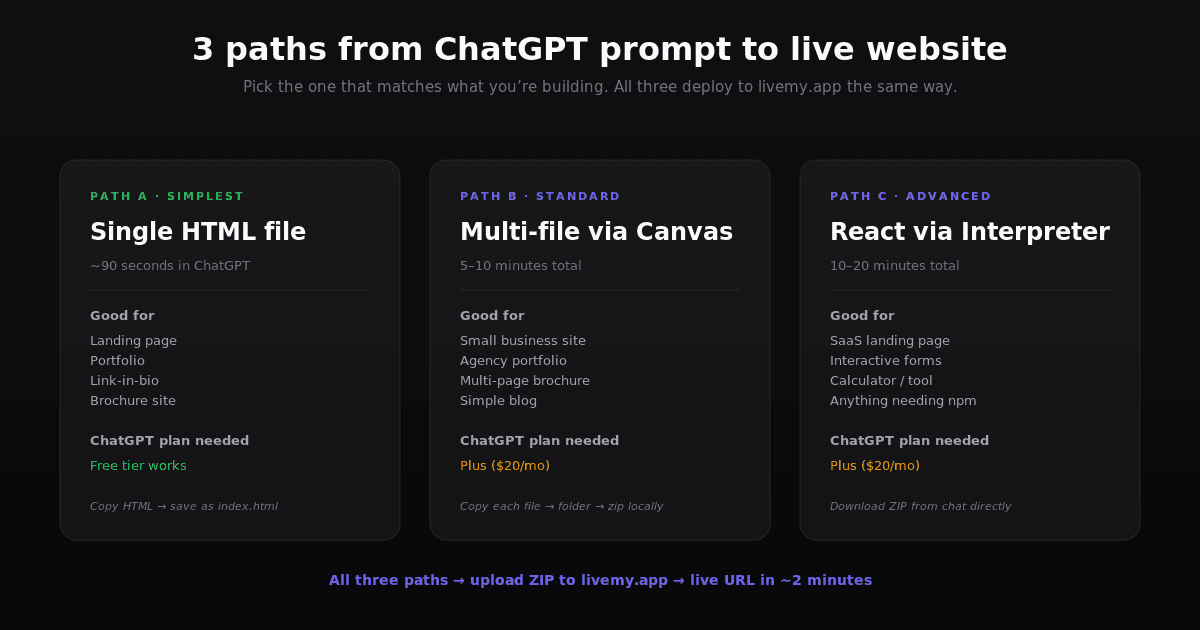
What you ask for changes what you get. There isn’t one workflow — there are three, and the right one depends on what you’re building.
Path A: Single HTML page (about 90 seconds in ChatGPT)
For a one-page landing site, portfolio, simple brochure, or coming-soon page. Ask ChatGPT for “a complete HTML file including CSS and JavaScript inline” for whatever site you want. Paste the result into a single .html file on your computer. Done.
Pros. Simplest possible workflow. Single file means single upload means live in a minute.
Cons. No internal navigation between multiple pages. Hard to maintain when the page gets long.
When this works. Marketing landing pages, lead capture pages, link-in-bio sites, conference signup pages, “we’re hiring” pages, almost any single-screen content.
Path B: Multi-file site via Canvas (5–10 minutes)
For a multi-page site or anything that wants shared components. ChatGPT’s Canvas mode lets the AI generate multiple files in one conversation. Open a new chat, click the Canvas icon at the top of the input bar, and ask for “a multi-page website with index.html, about.html, contact.html, and a shared styles.css for [your idea].”
When the files appear, copy each one into its own local file in a project folder. Then zip the folder.
When this works. Small business sites, agency portfolios, multi-page brochure sites, simple blogs.
Path C: React or Next.js project via Code Interpreter (10–20 minutes)
For anything more involved — interactivity, forms, fetching data, anything beyond static content. The Code Interpreter (sometimes still called Advanced Data Analysis) can generate a complete React or Next.js project, install dependencies, and serve you a ZIP file you download directly from the chat. It works even on the free ChatGPT plan, with usage limits — Plus ($20/month) removes the limits and gives priority access.
Prompt template: “Generate a Vite + React project for [your idea]. Include package.json with all dependencies. Bundle the project as a ZIP file I can download.”
When this works. Anything beyond a brochure. SaaS landing pages with interactive forms. Calculators. Portfolio sites with dynamic content. Anything that needs npm.
The 4 prompts that actually work
Templates I’ve leaned on enough to trust. Copy, paste, fill in the bracketed bits.
1. The brief-generator prompt
Generate a prompt for creating a website based on HTML, CSS, and JS for [your business / project type]. Make it detailed and specific to the business style. Cover aesthetic, sections, key features, copy tone, and target audience.
2. Single landing page
Build a complete one-page HTML site for [my business / project / event]. Include CSS and JavaScript inline. Make it mobile-responsive. Use modern minimalist design with [your color preference]. Include sections for hero, three feature blocks, a testimonials row, FAQ accordion, and footer. Output as one complete HTML file ready to paste into index.html.
3. Multi-page business site (use Canvas)
Create a 4-page website for [my business]: index.html, about.html, services.html, contact.html. Plus styles.css and script.js, both shared across pages. Modern responsive design. Each page should have nav, hero, 2-3 content sections, and footer. Use placeholder text where I haven’t given you content.
4. React landing page with a form (use Code Interpreter)
Generate a Vite + React + Tailwind project for [my business]. Include a contact form that submits to a placeholder /api/contact endpoint. Add hero, features grid, pricing cards, FAQ, and footer. Package the whole project as a downloadable ZIP including package.json and all dependencies listed.
5. Iterating on what you got
Show me the index.html again. Add [specific change]. Don’t rewrite the whole thing — show me only the section that changed and tell me which file or line to update.
Quick note on the last prompt: ChatGPT loves rewriting the whole file when you ask for a small change. The “show me only the section that changed” tweak saves a lot of time once your file gets long.
From code to a live URL on livemy.app (about 3 minutes)
You have files. Now you need a real address — yoursite.com, or a livemy.site subdomain — that anyone on the internet can visit.
Step 1: Zip your project (or use the ZIP ChatGPT made)
If you took Path A (single HTML): create a folder, put the index.html inside, zip the folder.
If you took Path B (multi-file): zip the whole folder with all the HTML, CSS, and JS files inside.
If you took Path C (ZIP from Code Interpreter): you already have it. Download from the chat.
Step 2: Sign up at livemy.app
Go to livemy.app and click Start free. No credit card. The Free plan is enough to test the deploy: 1 project on a livemy.site subdomain, live for 3 days after you create it and then offline, with your code, data and URL kept for 30 days. For a site real people will visit, pick Maker ($10/month) before going live — your own custom domain, more projects and deploys, a 99.5% uptime SLA, and the site up around the clock.
Step 3: Create a project, upload the ZIP
In the dashboard, click New project → Upload archive and drop the file in. livemy.app auto-detects the stack — Vite, React, Next.js, plain HTML — and configures the build. No Dockerfile. No settings to wrestle with.
Step 4: Wait for the deploy
Typical time: 2 to 5 minutes for a Vite/React project, under a minute for a single HTML file. The dashboard streams the build log live as it runs.
When status flips to Live, you get a URL like your-app.livemy.site.
Step 5: Point your own domain at it
On Maker, click Add custom domain in project settings, paste your domain, update one DNS record at your registrar — Cloudflare, Namecheap, GoDaddy all support this. Within 1–10 minutes the DNS propagates and Let’s Encrypt SSL fires automatically. HTTPS without touching nginx, without renewal cron jobs.
What goes wrong (and how to fix it)
Five things tend to break ChatGPT-generated websites in the wild.
Broken images. ChatGPT often invents image filenames like hero-image.jpg that don’t exist anywhere. Find and replace them with real image URLs (Unsplash for free stock, your own files, or generate via DALL·E and host the result).
Missing JS dependencies. If the page uses jQuery, Bootstrap, or similar, ChatGPT sometimes assumes you have them locally. Either add the CDN <script> tag at the top of the HTML, or paste the CDN URLs into your prompt before generating.
Mobile layout breakage. ChatGPT’s first attempt is often desktop-first. Ask it: “Make this fully mobile-responsive with media queries, a proper viewport meta tag, and a hamburger menu for nav.” It’ll redo the CSS.
SEO basics missing. No title tag, no meta description, no Open Graph tags. Ask: “Add SEO meta tags including title, description, og:title, og:description, og:image, and a favicon link to index.html.”
Form submissions go nowhere. Static HTML can’t process forms on its own. Two options: use a service like Formspree or Basin (changes one form attribute, no backend needed), or move to a Path C React project with a real form handler.
How much does building a ChatGPT website actually cost?
Honest question, three line items in the answer.
ChatGPT. The free tier handles single-file HTML generation, and Canvas and Code Interpreter are available on Free too, with usage limits. Plus ($20/month) removes those limits and adds priority access. Most simple sites are buildable without paying.
Hosting. livemy.app Free is enough to test the deploy, but a Free project goes offline 3 days after you create it — so a live production site with a custom domain means Maker at $10/month. Worth pricing this against Webflow, Squarespace, and Wix — all sit in the same $14–25/month range. The difference: with livemy.app you own the code and can take it anywhere.
Custom domain. A .com costs around $10–15/year at a registrar like Namecheap or Cloudflare.
Realistic monthly total for a production site: $20–35 plus the domain.
FAQ
Can ChatGPT actually make a website?
Yes. ChatGPT generates HTML, CSS, and JavaScript code that runs in any browser. It does not host the site for you. You take the code it generates and put it on a host (livemy.app, Netlify, Vercel, or a traditional web host). The code is yours to use, modify, or move.
Do I need ChatGPT Plus or Pro?
No. The free tier of ChatGPT can produce single-page HTML/CSS/JS that’s good enough for most landing pages, and Canvas and Code Interpreter are available on Free too, with usage limits. Plus ($20/month) removes the limits and gives priority access.
Where do I host a ChatGPT-generated website?
Any web host that accepts HTML files. livemy.app handles static HTML, Vite, React, Next.js, and other modern frameworks without configuration. Drop the ZIP, get a live URL with SSL in 2 minutes — on the Free plan for a three-day test drive, on Maker at $10/month for a site that stays up on your own domain.
How long does the whole thing take?
For a single-page site: roughly 10 minutes of ChatGPT iteration plus 2 minutes of deploy. For a multi-page site via Canvas: 15–30 minutes plus deploy. For a full React or Next.js project via Code Interpreter: 30–60 minutes plus deploy.
Can I use ChatGPT to update my site after it’s live?
Yes. Paste the current file into a new ChatGPT conversation, ask for the specific change, copy the updated code, re-deploy on livemy.app. Maker includes 50 deploys a month.
Is the code ChatGPT generates good enough for production?
For brochure sites, landing pages, and simple portfolios — yes, typically clean and modern enough. For SaaS apps with users, payments, and a database, ChatGPT can write the code but you’ll want a developer (or an AI coding tool like deploy a Cursor app) to review security, error handling, and edge cases. Treat the output as a strong starting point, not always a finished product.
Deploy your ChatGPT-built site in 3 minutes
Prompts ready, path chosen, ZIP in hand. The only thing between you and a live URL is one upload.
→ Start free on livemy.app · No credit card · Deploy your ChatGPT-built site in about 2 minutes, then move to Maker when it goes public.
Questions on the deploy side? Drop a line to hello@livemy.app. The team replies within one business day, build log included if you’ve got one.
Read next

Dmytro Chervonyi
,
Co-founder & CMO, livemy.app
Co-founder & CMO at livemy.app. 12 years as a CMO scaling SaaS from $0 to $10M+ ARR across marketing, sales, and infra products and tools. Now building the missing step between AI-built code and a live URL — for non-developers who’d rather ship than learn DevOps.


