How we built livemy.app: a self-healing PaaS on a bare-metal Proxmox cluster
The engineering behind a one-click PaaS designed for the AI era — bare-metal Proxmox infrastructure, WireGuard mesh networking, a warm-pool deployment engine, and an AI agent that handles natural-language server configuration.
Dmytro Chervonyi
Co-founder & CMO, livemy.app
Last updated
TABLE OF CONTENTS
item
AI Summary
livemy.app is a self-hosted PaaS built specifically for the AI era — designed for non-developers and vibe-coders who can prompt an AI into a working app but hit a wall the moment they try to ship it. The engineering: a bare-metal Proxmox cluster running LXC containers, WireGuard mesh networking across Proxmox, Hetzner, and dedicated nodes, a two-speed asynchronous deployment pipeline with security scanning in parallel, a warm pool architecture that reduces cold-start latency from minutes to ~15 seconds, and a natural-language AI Assist agent that handles dependency configuration. Automated Let’s Encrypt SSL, daily backups, and 1-click public GitHub deploys round out the platform.
The paradigm shift, in one sentence
A new class of builders has emerged — non-developers, founders, designers, marketers, vibe-coders — who can prompt an AI into a fully functioning, beautiful application in a couple of hours. Alongside them, agentic software engineers like Claude Code, Cursor, and deploy a Windsurf app are writing entire codebases autonomously.
None of them know Git-flow. None of them want to wrestle with AWS IAM policies or Kubernetes manifests. And for the longest time, they had no good way to put what the AI built on the internet.
This is the story of how we built livemy.app to fix that.
The spark: a marketer, an AI, and a deployment wall
It started with me. I’ve spent 12 years as a CMO — tech-forward, comfortable around engineers, but not a developer. With an AI assistant I vibe-coded a fully functional app of my own. It worked beautifully on localhost. Then I hit a wall: I built it, but I couldn’t get it online.
The hosting options I tried were each broken in a different way:
Heroku / Vercel. Simple, until they got expensive. Rigid limits. Required either GitHub-flow knowledge or complex buildpacks.
AWS / GCP. Overkill. Spinning up a single secured container required a junior DevOps certification.
A VPS. Cheap, but forced me to configure SSH, systemd, Nginx, SSL certificates, firewall rules — all by hand.
There was a gaping hole in the middle. Why couldn’t a builder upload a ZIP of their code, paste a Git URL, and have it live in seconds? No configuration files. No deployment friction. Just vibes.
That was the inception of livemy.app. Around the same time, a VPS startup came to me for a marketing consultation — and instead of talking channels, I told them about this wall. About five months later they came back with an MVP and asked me to join as a partner. We debated names — Vibe Hosting? AI-Deploy? — and eventually landed on livemy.app. The project today is a fully-fledged PaaS hosting dozens of active production apps.
The core infrastructure: bare metal, multi-cloud, WireGuard mesh
Most modern PaaS platforms wrap AWS or DigitalOcean APIs. Convenient, sure — but it makes you a middleman with tight margins and zero infrastructure control. We went the other way: bare metal.
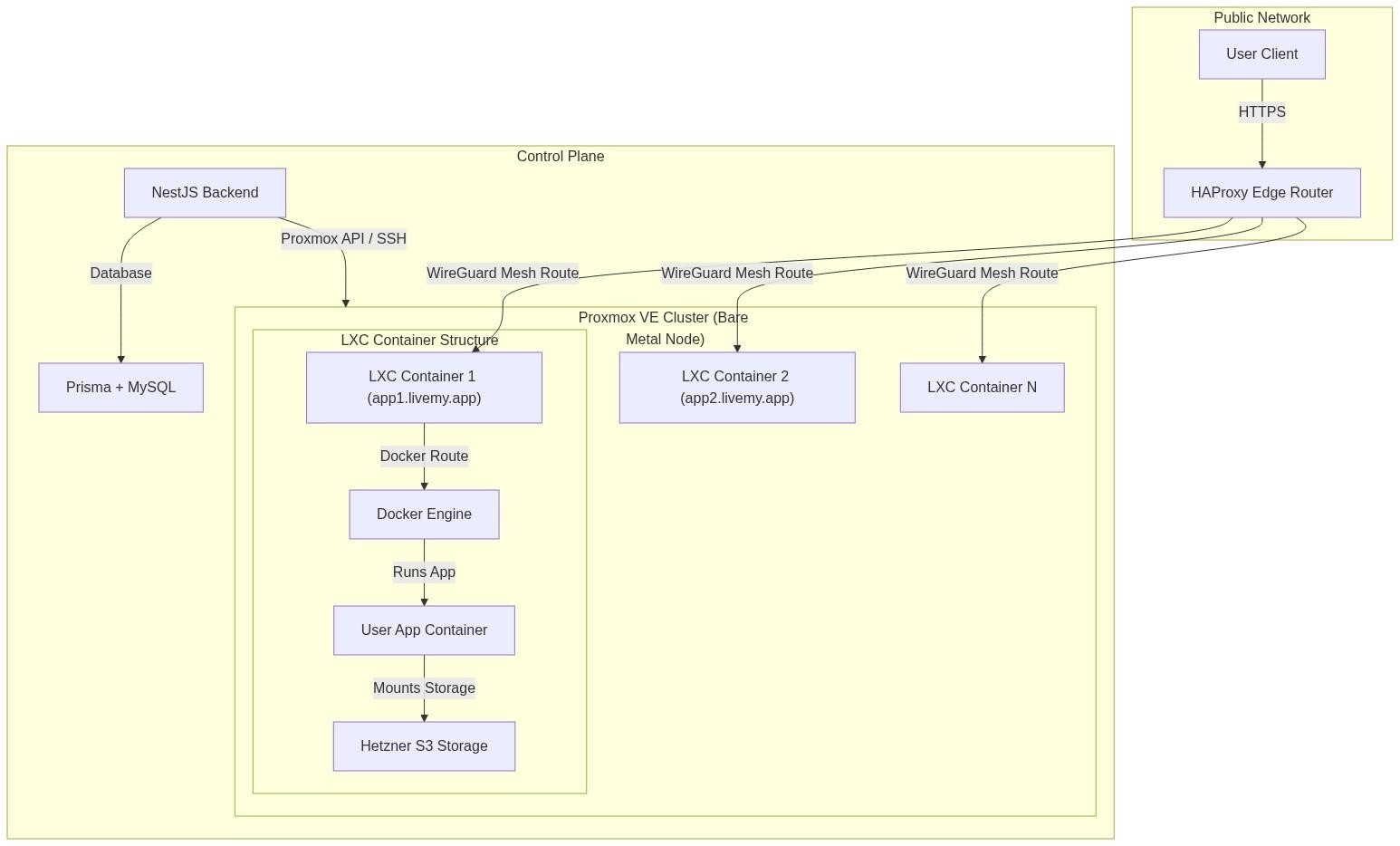
Our private cloud runs on a Proxmox Virtual Environment (VE) cluster. Proxmox gives us direct, hypervisor-level control over physical servers. Inside the cluster:
Lightweight, highly efficient LXC (Linux Containers) per project.
Networking, CPU/RAM resource limits, and storage quotas managed directly.
HAProxy at the edge as our routing layer, coupled with DNS record automation.
On top of that, we wrote a custom NestJS control-plane backend. It exposes the API, manages database state (Prisma + MySQL), orchestrates communication with the Proxmox hypervisors, handles Stripe billing, and tracks usage limits.
Expanding beyond Proxmox: Hetzner and dedicated servers
As the platform grew, we made the provisioning engine cloud-agnostic. The core still runs on Proxmox, but the backend can now provision and deploy directly onto:
Hetzner Cloud VPS — for rapid, cost-effective scaling on public infrastructure.
Dedicated (bare-metal) servers — letting professional clients bring their own hardware, connect it over SSH, and instantly turn it into a managed livemy.app node.
Gluing this heterogeneous network together was the next problem. We engineered a secure, automatic WireGuard mesh network. Every node — Proxmox hypervisor, Hetzner VM, dedicated server — joins the same private WireGuard mesh. Traffic from our HAProxy edge routers flows through encrypted tunnels directly to the target container. No client workload is ever directly exposed to the public internet.
The async deployment engine and the warm pool
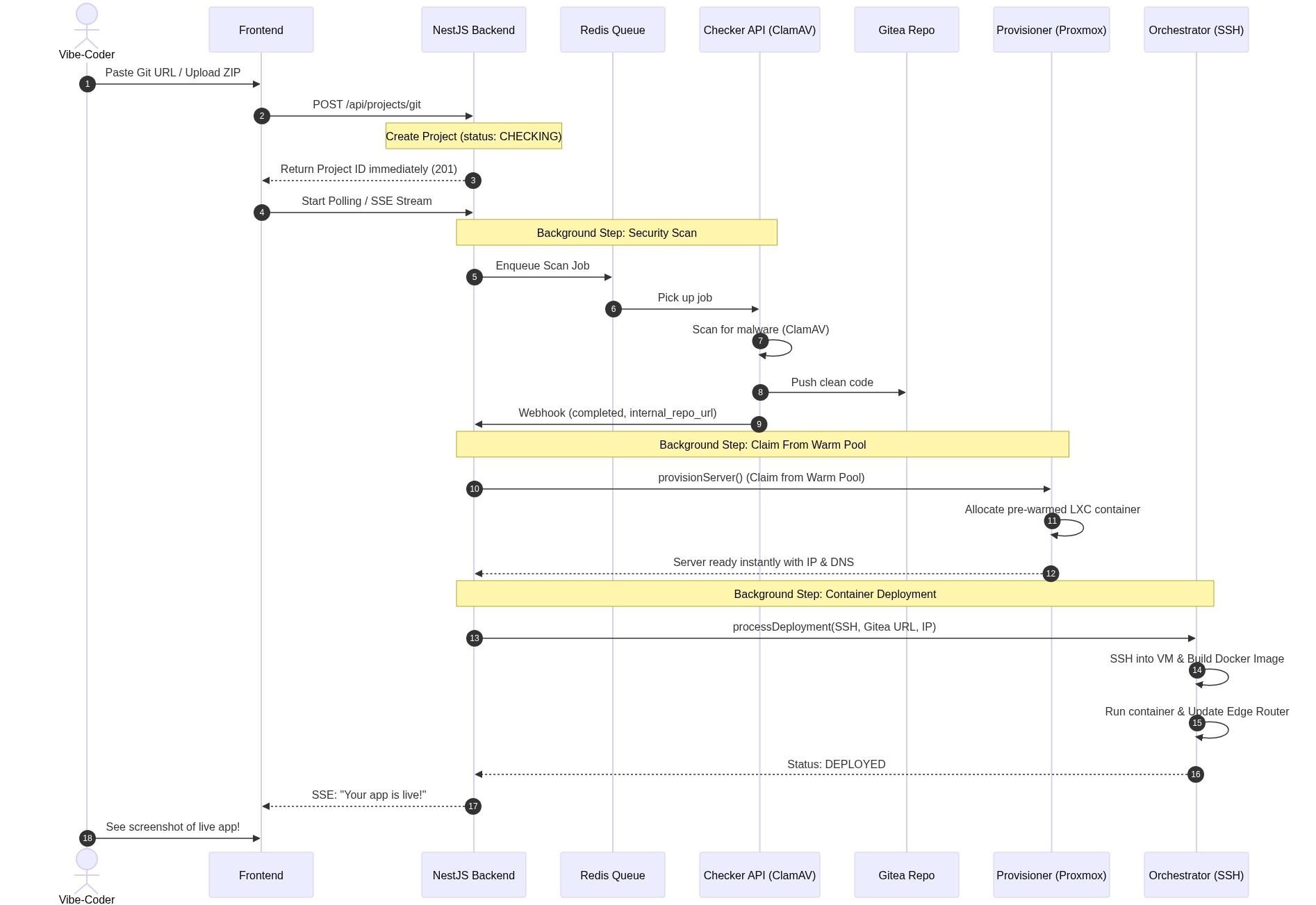
To deliver a one-click experience, our backend coordinates several decoupled microservices and agents:
Backend (NestJS) — the brain. API, database state, job coordination.
Checker API — the gatekeeper. Clones or unpacks projects, runs ClamAV antivirus, packages verified code into an internal Gitea repository.
Provisioner — the infrastructure engineer. Talks to Proxmox or Hetzner to spin up containers and assign IPs.
Orchestrator — the deployment specialist. SSH into the target node, pulls verified code from Gitea, builds a Docker image, runs the container.
The warm pool architecture — making 10-minute deploys feel instant
A raw deployment — clone the code, scan for malware, provision a virtual container, install system packages, build a custom Docker image, configure edge routing — typically takes 5 to 10 minutes of heavy computation. Vibe-coders expect a live URL in seconds.
To bridge that gap, we built a warm pool system. The control plane maintains a continuous pool of pre-provisioned, warmed-up, secure LXC containers on Proxmox and Hetzner. Docker pre-configured. WireGuard routes pre-established. Networking pre-plumbed.
When a user clicks Deploy, the Provisioner doesn’t spin up a server from scratch. It claims an active container from the warm pool, maps the user’s project to it, and tells the Orchestrator to pull and run the application. Cold-start latency drops from minutes to under 15 seconds.
A two-speed pipeline: Classic Flow and Fast Flow
Security scanning takes time, but vibe-coders want instant gratification. We split deployment into two strategies depending on what the user is shipping.
Classic Flow (security first)
Ideal for public production deployments.
The frontend uploads a ZIP archive or pastes a Git link.
The system blocks deployment until the Checker API finishes unpacking, ClamAV scanning, and repacking the repository into Gitea.
Once the webhook returns
completed, the Provisioner claims a Proxmox container.
Fast Flow (speed first)
Ideal for rapid prototyping and trusted environments.
The backend immediately writes Project metadata to MySQL via Prisma.
A deterministic VM serverName is generated.
Proxmox provisioning fires instantly, in the background, while ClamAV scans in parallel.
If a virus is detected, the container is torn down. In 99% of cases the VM is already online before the user is done waiting.
In NestJS, that’s a clean async pattern — spawn background promises without blocking the HTTP response thread.
Concurrency gotchas that almost broke us
When you design async distributed systems, network latency is your worst enemy. Two architectural bugs almost derailed our stability during stress testing. Worth documenting.
Gotcha #1: the lightning-fast webhook race
In Classic Flow, the Checker API is fast. Sometimes it processed a small repo, repacked it, and sent the completed webhook back to NestJS before the initial NestJS transaction had committed the project to the database.
When the webhook arrived, the Prisma findUnique by checkerTaskId returned null because the record wasn’t fully committed yet. The deployment hung indefinitely.
The fix: an elegant wait-and-retry inside our WebhookService. If the first lookup returned null, fall back to findFirst on projects with status uploaded or checking and a null checkerTaskId — ordered by createdAt descending. The webhook then patches the matching record. No more hanging deploys.
Gotcha #2: double-provisioning under high concurrency
In Fast Flow, the Provisioner could occasionally fire twice for the same project under high concurrent load. Two LXC containers would be allocated. One would race the other to register with the edge router. Whichever lost would orphan its IP allocation.
The fix involved a Redis-backed distributed lock keyed on project ID, scoped to the provisioning operation. The lock holds for the duration of the provision attempt and releases on success or failure. The second attempt sees the lock and bails out gracefully. Orphan containers vanished from our metrics.
AI Assist: natural-language server configuration
Vibe-coders don’t write Dockerfiles. If an app needs a PostgreSQL database, a custom env variable, or a Nginx reverse-proxy rule, the container can’t magically know that. So we built an AI Assist engine.
When a project is uploaded, our system analyzes the codebase to detect the framework, database requirements, and package dependencies. If anything custom is needed, the user doesn’t open a terminal. They type their requirements in natural language:
Add a Redis cache, set the PORT environment variable to 8080, and configure Nginx to proxy /api requests to the backend.
The AI Assist Agent logs in, generates the necessary configuration files, sets up system-level services inside the container, verifies network connectivity, and restarts the environment. The user watches the changes happen in the dashboard.
1-click deploy for public GitHub repos
Because our AI agent is good at analyzing arbitrary codebases, we extended the platform to support 1-click deployments of any public GitHub repo. Paste a link to a well-known open-source repository — a self-hostable blog, a chat app, a dashboard. The Checker API clones the repo, ClamAV checks it, AI Assist works out how to containerize and launch it.
This turned into a game-changer in two directions. Open-source maintainers can offer an instant “Deploy to livemy.app” button. Users who want to self-host open-source tools — n8n, Ghost, Plausible, self-host Uptime Kuma, WireGuard — can do it with zero effort.
Custom domains, Let’s Encrypt, automated backups
Two operational requirements we had to nail before calling the platform production-ready: custom domain routing and disaster recovery.
Custom domains and SSL
Every project gets a free subdomain on livemy.site. To add a custom domain, the user pastes it into project settings. Our Edge HAProxy router is automatically reconfigured via the NestJS Controller API. The router triggers an ACME challenge, provisions a Let’s Encrypt SSL certificate, and configures HTTPS redirection. Zero manual intervention. All traffic encrypted.
Automated backups
Bare-metal hosting runs on physical disks, and physical disks fail. We built a multi-tiered backup system:
LXC container snapshots — nightly snapshots of the container state, instructed via the Proxmox API.
Volume backups — persistent volumes snapshotted independently to handle stateful workloads.
Off-site replication — snapshots replicated to Hetzner S3 storage for disaster recovery beyond the primary cluster.
One-click restore — surfaced in the dashboard. Pick a snapshot, click restore, watch the container come back.
Backups are a $5/month add-on. For any project with persistent data, we recommend turning them on the moment you go live.
What we got right (and what we’d do differently)
A few honest reflections.
Bare metal was the right call. Margins, latency, and control are all measurably better than running on top of AWS. We can offer flat predictable pricing because we own the unit economics end-to-end.
The warm pool was worth the complexity. A 15-second cold start is a feature non-developers can feel. A 10-minute cold start is a churned signup. The engineering investment pays back every single deploy.
WireGuard mesh has been boring in the best way. Boring is what you want from a network fabric. Once it was set up, we’ve barely touched it.
The AI Assist agent saved more user support tickets than we expected. Most “how do I configure X” questions resolve in natural-language conversation rather than docs links.
What we’d redo: we initially under-invested in observability. Build-time and routing-layer metrics existed, but per-deploy traceability needed retrofitting later. If you’re building anything similar, instrument every queue, webhook, and SSH session from day one.
Where this goes next
livemy.app is in Open Beta. The platform hosts dozens of active production apps shipped by people who don’t write code for a living — marketers, designers, founders, vibe-coders.
If you’re building something with Cursor, Lovable, Claude Code, Bolt.new hosting, v0, ChatGPT, Gemini, Copilot, Base44, or any other AI builder — we’d like to host it. The free tier is enough to try. The Maker tier ($10/month) is enough to ship to real users.
→ Start free on livemy.app · No credit card · Bare-metal infrastructure, AI-assisted configuration, flat pricing.
If you’d like to chat about the architecture, swap notes on warm pool design, or have feedback on the platform, drop a line: hello@livemy.app.
Read next

Dmytro Chervonyi
,
Co-founder & CMO, livemy.app
Co-founder & CMO at livemy.app. 12 years as a CMO scaling SaaS from $0 to $10M+ ARR across marketing, sales, and infra products and tools. Now building the missing step between AI-built code and a live URL — for non-developers who’d rather ship than learn DevOps.


